
Best Tablet for Kids Homeschool UK (2026)
The best tablet for kids homeschool in the UK, for most children aged 8 to 11, is the Samsung Galaxy Tab A11 Kids Edition, with a case and a tethered pen in the box. Younger children may suit the Amazon Kids Tablet 8. Older learners who take notes may suit the Lenovo Idea Tab or the iPad. Specs come from UK Amazon listings, with reviews from MadeForMums and PCMag UK, checked 24 November 2026. The editorial team has not tested these tablets.

The best tablet for kids homeschool in the UK, for most children aged 8 to 11, is the Samsung Galaxy Tab A11 Kids Edition. The UK listing includes a shock absorbing case with a carry handle and a stand, a Crayo-Pen on a tether, 64GB of storage, 4GB of memory, a microSD slot and Android 15. For children under 8, the Amazon Kids Tablet 8 and its bumper or slim case offer a gentler introduction. Older learners who need to take notes may be better suited to the Lenovo Idea Tab with pen or the iPad.
Specs come from the UK Amazon listings and the makers' help pages, with reviews from MadeForMums and PCMag UK, checked on 24 November 2026. The editorial team has not tested these tablets. This guide brings published information together.
Jump to: Quick picks · Age-fit table · The tablets · How to choose · Parental controls · FAQ
We may earn a commission if you buy through links on this page. It never changes our verdicts. How we review.
Quick picks
- Best overall for ages 8 to 11: Samsung Galaxy Tab A11 Kids Edition (case, tethered pen, Android 15)
- Best for ages 5 to 7: Amazon Kids Tablet 8 (kid-proof bumper, a year of Kids+)
- Best for handwriting and notes: Lenovo Idea Tab with Tab Pen (11 inch 2.5K screen, pen in the box)
- Best for 12 and up: Apple iPad (A16) (128GB, Apple Pencil support, landscape front camera)
Samsung Galaxy Tab A11 Kids Edition, Wi-Fi, 64GB, Blue Case.
Amazon Kids Tablet 8 (newest gen), ages 3+, kid-proof bumper.
Age-fit table
Ages are a guide, not a rule. A careful six-year-old may be fine with a slimmer case, and a bouncy ten-year-old may still need the bumper. The age bands below are this page's suggestions, except where a listing title states an age. Here is how the picks line up for home learning.
| Age | Tablet | Operating system | Parental controls | Pen support | Kid-proof case |
|---|---|---|---|---|---|
| 5 to 7 | Amazon Kids Tablet 8, ages 3+ | Android with Google Play, plus Kids+ | Amazon Kids Parent Dashboard; Google Family Link for Play apps | Not listed | Kid-proof bumper included |
| 6 to 8 | Amazon Kids Tablet 8, ages 6+ | Android with Google Play, plus Kids+ | Amazon Kids Parent Dashboard; Google Family Link for Play apps | Not listed | Slim hard case included |
| 8 to 11 | Samsung Galaxy Tab A11 Kids Edition | Android 15 (listing) | Parental control listed as a special feature; Google Family Link on Android | Crayo-Pen included, on a tether | Shock absorbing case with handle and stand |
| 8 and up, note-takers | Lenovo Idea Tab with Tab Pen | Android 15 or later (listing) | Google Family Link | Lenovo Tab Pen included | Not included, buy one |
| 12 and up | Apple iPad (A16) | iPadOS | Screen Time with Family Sharing | Apple Pencil (USB-C), sold separately | Not included, buy one |
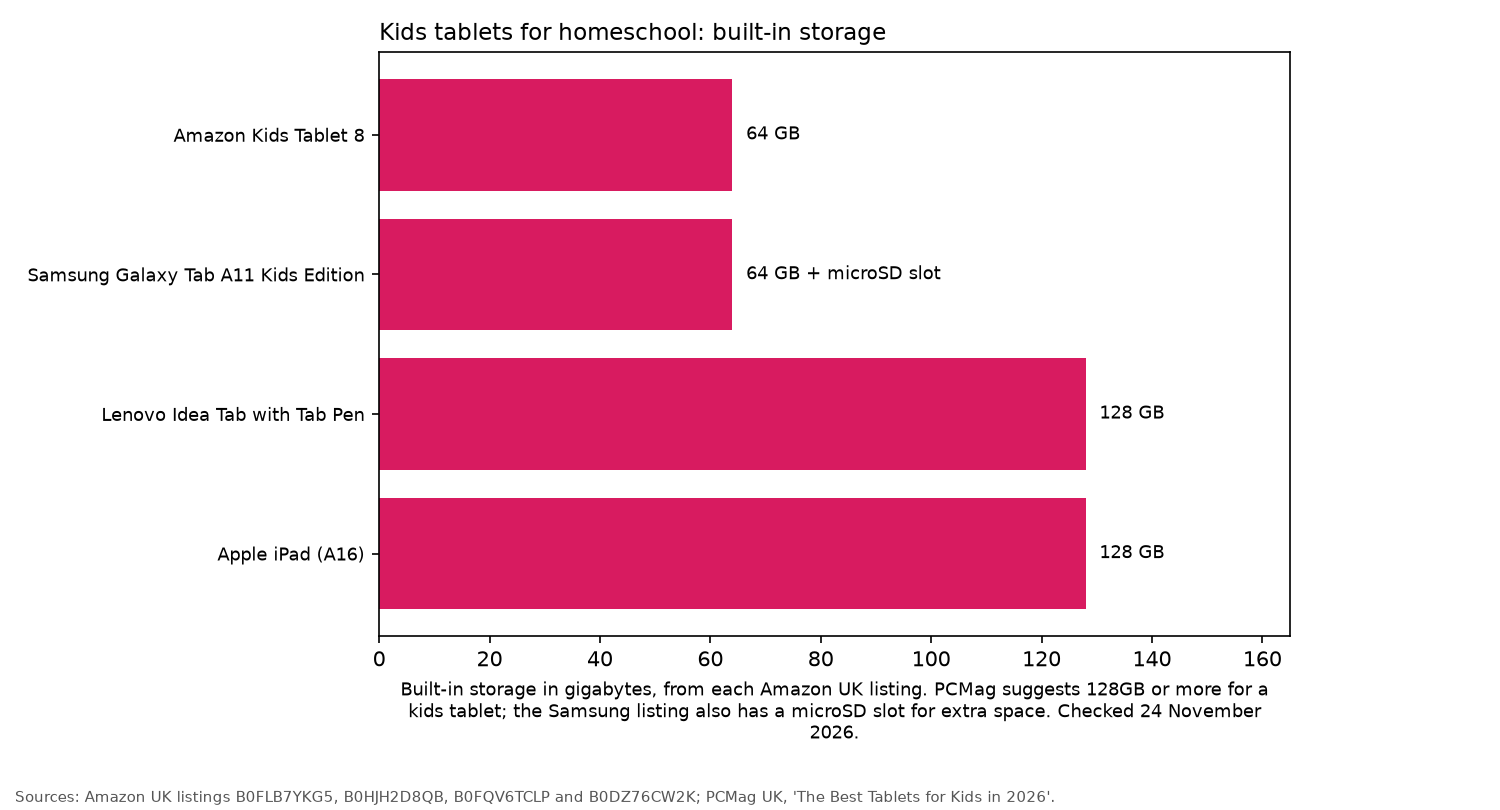
Storage matters for home learning: downloaded lessons, reading apps and videos for car journeys all add up. PCMag suggests 128GB of built-in storage or more rather than 64GB, and says a microSD card slot can't hurt. The Samsung listing confirms a microSD slot.
Samsung Galaxy Tab A11 Kids Edition: best overall
The linked listing is the Wi-Fi model with the blue case and 64GB. It bundles the 8.7 inch Galaxy Tab A11, with 64GB of storage, 4GB of memory and a microSD slot, into a shock absorbing case with a carry handle and a stand for upright or flat viewing. A Crayo-Pen is included on a tether, so the listing says it stays with the tablet rather than under the sofa. That tether is useful for phonics tracing and maths workings. The listing gives Android 15, and its special features include parental control, expandable storage and stylus support.
The product title says a 3 year warranty. A bullet on the same listing says a two year manufacturer warranty. Those lines do not agree, so this page does not treat one of them as the warranty length.
Who it's for: children from about 8 who need a real Android tablet and a sturdy case. That age is this page's suggestion. The listing's age range description says "Kid" and does not give a numbered band. Who it isn't for: older learners who want a bigger screen for split-screen work. The screen on this listing is 8.7 inches.
Samsung Galaxy Tab A11 Kids Edition, Wi-Fi, 64GB, Blue Case.
Amazon Kids Tablet 8: best for ages 5 to 7
MadeForMums rated the previous Fire HD 8 Kids its best kids tablet overall for value, praising the robust case and parental controls. The newest generation has changed. A help section on Amazon's listing says the new Amazon Kids Tablet runs Android with Google services and the Google Play Store, replacing Fire OS and the Amazon Appstore. That matters for homeschool, because the same help text says a child can request apps such as Google Classroom from the Play Store, and a parent approves them through Google Family Link.
A spec table on the listing gives an 8.7 inch 1340 x 800 screen, 4GB of memory, 64GB of storage and up to 14 hours of video playback. A bullet on the same listing says more than 12 hours of video playback. A year of Kids+ is included. Both listings say it auto-renews at the applicable rate. The ages 6+ bullets add that you can cancel anytime. The ages 3+ bullets say the Amazon Kids Parent Dashboard app lets you set limits, press pause and approve content remotely. The ages 3+ version comes with a kid-proof bumper. The ages 6+ version has a slim hard case. This generation is new, and when we checked it had only a handful of Amazon ratings, so there are few reviews yet.
Who it's for: younger children starting with reading and number apps. The ages 5 to 7 fit is this page's suggestion. The listing titles state ages 3+ and ages 6+. Who it isn't for: older children who will find the Kids+ layer babyish. That is this page's suggestion, not a line on the listing.
Amazon Kids Tablet 8 (newest gen), ages 3+, kid-proof bumper.
Amazon Kids Tablet 8 (newest gen), ages 6+, slim hard case.
Lenovo Idea Tab with Tab Pen: best for handwriting and notes
MadeForMums lists the Lenovo Idea Tab with Tab Pen as its best tablet for students, for ages 8 and up. The review praises the screen, the sound and the pen, and says it is a little bit slow at times. It also says the tablet suits schoolwork, note-taking and general family use. The Amazon listing gives an 11 inch 2.5K (2560 x 1600) screen, a MediaTek Dimensity 6300, 4GB of memory, 128GB of storage, quad speakers with Dolby Atmos and a 3.5mm headphone jack, with the Tab Pen in the box. The product description gives a 1 year courier warranty.
Who it's for: children who write notes, annotate worksheets or draw diagrams. The ages 8 and up fit follows MadeForMums. Who it isn't for: young children, unless you add a sturdy case. None is included on the listing.
Lenovo Idea Tab 11 inch 2.5K, 128GB, with Tab Pen.
Apple iPad (A16): best for 12 and up
MadeForMums lists the 2025 iPad for teenagers aged 13 and up. PCMag notes that Apple doubled the entry storage to 128GB. The listing gives an 11 inch Liquid Retina display, the A16 chip, Touch ID, a USB-C connector and a landscape 12MP Center Stage front camera, which suits online lessons with the tablet on a stand. It supports Apple Pencil (USB-C). The pencil is not described as included. Scribble lets a child handwrite into any text field. The 12 and up fit on this page starts a year under MadeForMums' 13+ line. That is this page's suggestion.
Who it's for: older children doing independent study and online courses. Who it isn't for: families on a tight budget, once you add a case and pencil. Neither is included on the listing.
Apple iPad 11-inch (A16), Wi-Fi, 128GB.
How to choose a tablet for homeschool
- Age and maturity: use the table above as a start, then think about how gentle your child is with things.
- Operating system and apps: check which apps your curriculum or tutor needs. The Amazon Kids Tablet listings give access to Google Play. The iPad uses the App Store. The Samsung listing gives Android 15.
- Storage: 128GB leaves room for offline lessons, per PCMag's advice. 64GB tablets with a microSD slot can grow. The Samsung listing has that slot.
- Pen: for handwriting practice and maths, a pen in the box saves a separate purchase. The Samsung and Lenovo listings include one.
- Case: the Samsung and Amazon listings include one. The Lenovo and iPad listings do not.
A tablet works best at a proper workspace, so pair it with a kids desk for homeschool, and keep printing for worksheets with a homeschool printer. The homeschool planners guide helps keep screen sessions in the week's plan.
Parental controls and screen time
Every tablet here has free controls you can turn on. Google Family Link covers time limits, schedules such as school time and downtime, app approvals and web restrictions on Android. Apple's Screen Time needs Family Sharing and a Child Account, then lets you manage apps, contacts and when the iPad is used. Amazon's Parent Dashboard is described on the Kids Tablet listings. The Samsung listing names parental control as a special feature. Set the controls up before the first lesson, and review them each term as your child grows.
FAQ
What age should a child get a tablet for school work?
There is no fixed age. The Amazon listing titles start at ages 3+. MadeForMums lists the 2025 iPad for teenagers aged 13 and up. Match the tablet and its controls to the child.
Can a child use Google Classroom on an Amazon Kids Tablet?
On the newest generation, yes. Amazon's help text on the listing says a child can request apps such as Google Classroom from the Play Store, and a parent approves them through Google Family Link.
Is an iPad or an Android tablet better for homeschool?
Either works. The Android picks here include a pen or a case in the box. The iPad listing gives 128GB and Apple Pencil support, and it does not include the pencil or a case.
How much storage does a kids tablet need?
PCMag suggests 128GB of built-in storage or more rather than 64GB. A 64GB tablet with a microSD slot, such as the Samsung on this page, can take a card for extra space.
More from In the Trenches of Motherhood: Homeschool · Kids · How we review